Miskatonic

The Storyboards
A key part of Miskatonic is the discovery of each characters fears so they can be exploited during dialogue. To do this players are given the option to unlock clues that give snippets of a characters past. I was tasked with using the unlock system created by our lead programmer to let players unlock more viewable storyboards and a system for cycling through the pages. Both systems needed to be flexible enough to function if additional storyboard pages or characters if they were added, and one that is ideally easy enough for a designer to do without needing to do any additional programming.
The Bookshelf
To display the information I created a bookshelf system, as the original idea was to have books on a bookshelf in the game world that you would click on to view storyboards, though this was scrapped due to time constraints. The bookshelf is a singleton that all objects with the "Books" script will add itself to the Book List. When we scrapped the books in the game world it was decided that we would just handle this interactions via character portraits. When a portrait is clicked the corresponding characters storyboard will open

The Book script adding itself to the Bookshelf's book list

The current state of the game was tracked, storyboards would only open if the game was in the storyboard state
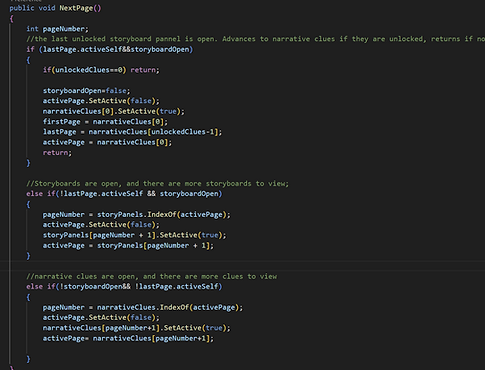
The function for advancing pages.
The Open Books
The OpenBook controlled interactions like switching pages and unlocking more pages. Functions were written without having a defined number of pages, instead tracking pages via a list to which more pages could be added. New pages that were added didn't require any programming and could be added by designers without programming knowledge
Creating a new character's book
Creating a new character and their book could now be done in a few simple steps.
1. Duplicate and rename an existing book.
2.Duplicate and rename an existing character portrait.
3.Assign the new book in the "Open Book" slot in the unity inspector.
4. Swap out the images in the sprite renderer for each clue and main storyboard page.
And that's it, the book is ready to go! While more work would need to be done to have every functionality for the character and their portrait, adding their book is a simple and streamlined process that requires no coding knowledge. Adding new pages is even simpler, only requiring duplicated an existing storyboard/clue and switching the image in the sprite renderer.
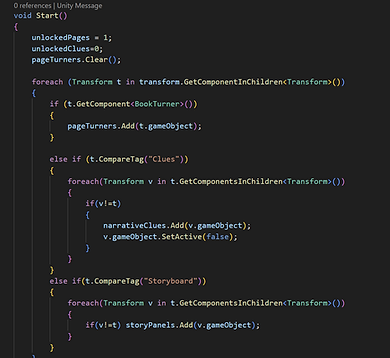
All the pages get automatically sorted and stored in the appropriate list with no defined minimums or limits

Drag and drop the respective object into Open Book and Source Image, and you have a new book ready to go

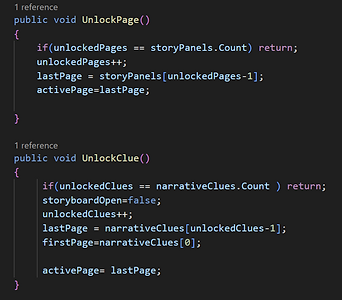
New pages can be unlocked when a shop card is selected
Unlocking pages
Our lead programmer developed a system for unlocking things via a shop. I was tasked with using this to create a way to unlock storyboards . Using the system I created a scriptable object which contains the variables found in every reward you can purchase, and an object that held the 'Unlock Narrative' script holding the variables unique to the narrative rewards. The script has a reference to the 'Character' enum so the target character can be selected in the inspector, and allow for any new characters. The 'Clue' bool indicated if this object was unlocking a clue or a main storyboard. Eight objects were made, one clue unlock and one storyboard unlock for each character. The script also fully accommodates the adding of new pages to a characters book without any coding required.